
Secrets
A secret is a container of key/value pairs. The key as well as the value are always strings. Secrets are stored encrypted in the database. The type of encryption as well as group and flow restrictions determine who can access the secret. Secrets can be used to store e.g. passwords, API keys and other sensitive information.
The list of secrets can be found under the Secrets tab in the main menu. Here you can also see the encryption type of the secret and whether it is still valid.
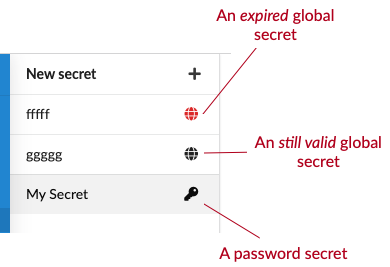
The encryption types are as follows:
Global
The secret is encrypted using a pre-shared key. This means that all Manatee instances can decrypt the secret. Which flows may use it is decided by its restrictions.
Machine only
The secret is encrypted using a machine key, so only Manatee instances on that machine can decrypt it. Saving values or changing the machine therefore requires a running Manatee on that machine. Other changes, such as the description or the restrictions, can be saved while it is offline.
User only
The secret is encrypted using a user key. You give a Windows username, and a user with that name must be logged in for the secret to be decrypted. As with a machine secret, a Manatee running as that user must be reachable through the Conductor when you save new values or change the user.
Shared password
The secret is encrypted using a password. Only somewhere that knows the same password can decrypt it. The password is used for encryption here and is not stored, so if you lose it the secret cannot be recovered.
TIP
The Machine only and User only options are hidden while the Conductor is offline, since neither can be encrypted without it. An existing secret of either type still shows its own type.
Secret editor
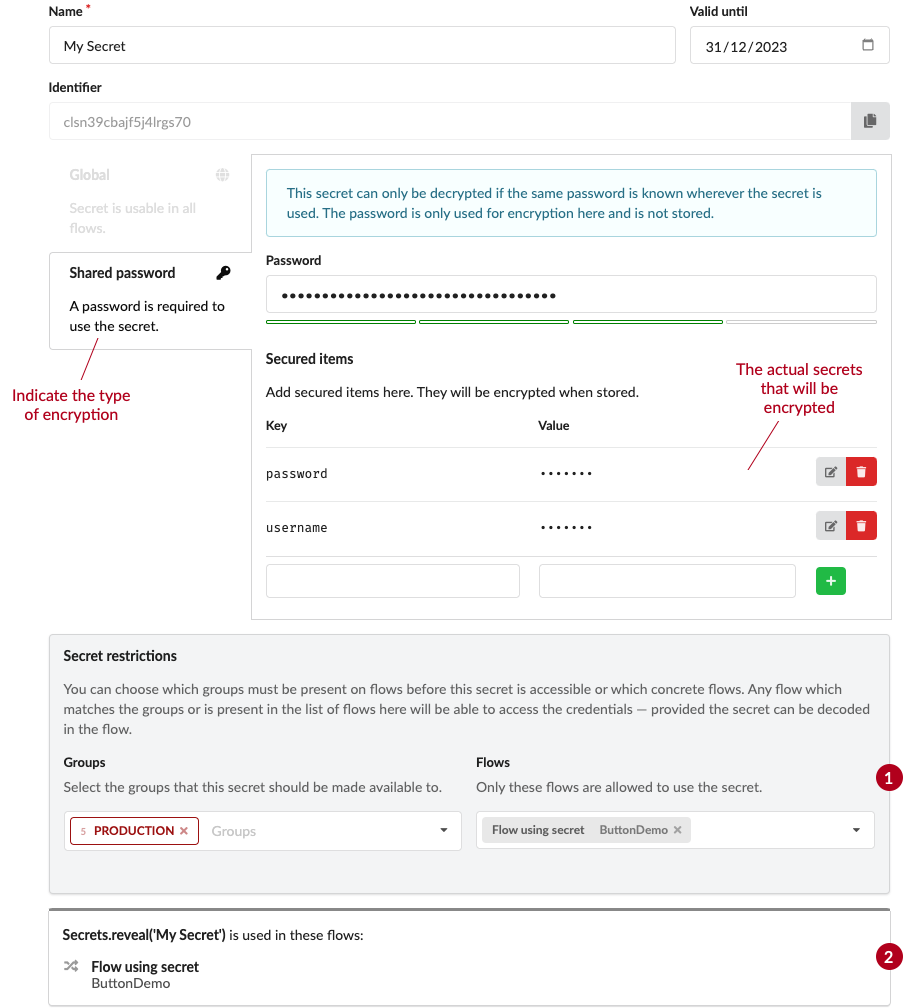
The main UI for secrets is the secret editor. Here you can edit the name, description and encryption type of the secret as well as add, edit and remove key/value pairs.
It is also possible to specify a valid until date for the secret. If this date is set the secret cannot be used after this date. This is useful for e.g. API keys that have a limited lifetime or for passwords that need to be changed regularly.
Restrictions on secrets
The encryption type of the secret determines who can access the secret. In addition to this you can also add restrictions to the secret. This is useful if you want to restrict the use of a secret to a specific flow or specific groups.
(1) in the image above shows the restrictions for the secret.
If you only specify groups the secret is available only where the primary and at least one secondary group match, exactly as for flows.
If you only specify flows then only these flows will be able to access the secret.
If you specify both groups and flows then either the groups must match or the flows must match.
If you specify neither then no flow can use the secret, and the editor shows a warning.
A group match wins outright
The two are not combined. Manatee checks the groups first, and if they match it hands over the secret without ever looking at the flow list. A flow restriction therefore only takes effect where the groups do not match — it narrows nothing on a machine the groups already cover.
Usages of secrets
(2) in the image above shows the usages of the secret. Here you can see which flows are using the secret and jump directly to where the secret is used.