Mask
A mask an “obstruction” that can hide a UI element or part of the screen. It can be used to indicate that the user should not interact with the UI element or to prevent the user from seeing information displayed here. It is not a full-proof security measure but can be useful to prevent accidental clicks or to hide information that should not be seen by the user.
This works on a Field instance by invoking the mask function. In the simplest case you can supply no arguments:
// Assuming you have a "OkButton" field defined
Fields.OkButton.mask();
The mask function returns a mask instance that you can use to control the mask:
var m = Fields.OkButton.mask();
// Remove the mask again
m.close();
Besides close() the mask instance exposes isVisible (read-only) plus color, blur and borderRadius, which can be read and written to change an already-showing mask:
var m = Fields.OkButton.mask();
m.color = "SteelBlue";
Or you can use the unmask function on the Field instance:
Fields.OkButton.mask();
// ...
Fields.OkButton.unmask();
Options
The mask function can take an object as argument to control the appearance and behavior of the mask. E.g. to control the color of the mask. The following options are available:
color(default:"Firebrick") The color of the mask. Should be a named color, e.g."blue".blur(default:false) Iftruethe mask will be blurred and no color will be applied.borderRadius(default:5) The corner radius of the mask in pixels.throttleMs(default:0) The time in milliseconds to wait before updating the mask position. Use this to reduce the number of updates if the underlying UI element or window is moved frequently.
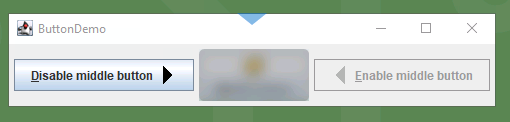
The blur mode looks like this:
Fields.OkButton.mask({ blur: true });