
Extension points
TIP
Extension points are a way to allow some customization of published flows. This makes it possible to publish generic functionality and enable the consumer of the flow to adapt it to her environment or other specific requirements.
The Extends module is useful for inlined hub published flows only and makes it possible to define extension points in strategical locations throughout the flow. When publishing the flow it is annotated with the extension points and these annotations are then used to provide a configuration UI when the flow is downloaded from the hub. Here the consumer of the flow can specify the inputs to these extensions which are then used when the flow is run in Manatee.
An example is the Extends.withString method. If you create a flow with the following content;
var greeting = Extends.withString("greet");
Dialog.info(greeting + "!", "...", {});
When you then publish this an inlined flow then you can provide info and directions for the consumer of the published flow wrt how to configure this extension point. E.g.:
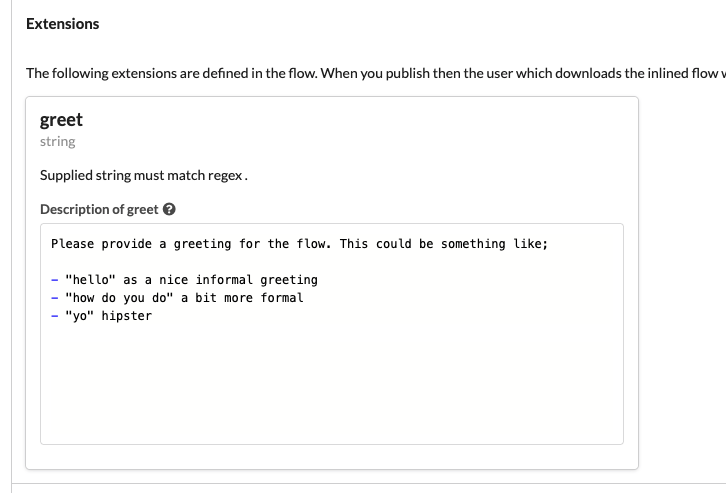
Once the flow is downloaded from the hub then it may configured as follows:

and when run the flow will display an info dialog with the “howdy!” title.
The extra arguments are read when publishing, not when running
Only the name argument is used by Manatee at run time - it is the key under which the consumer’s answer is looked up. The remaining arguments are read by Cuesta, which parses the flow’s source when it is published in order to build the configuration UI. They must therefore be literals written directly in the call.
For withSelection and withFlow this matters a great deal: if the second argument is not an array literal respectively an object literal, no extension point is registered at all and the consumer never gets to configure it.
Every one of these methods returns null when the flow is not a downloaded, inlined flow, or when the consumer left the extension point unconfigured. Guard accordingly.
The following extension methods are implemented:
String
Extends.withString(name, regex) can be used to allow the consumer of the published flow to provide a string matching a regex. The regex is optional and is applied by the configuration UI, not by the flow.
// Only allow greetings starting with "h"
var greeting = Extends.withString("greet", "h.*");
Dialog.info(greeting + "!", "...", {});
Selection
Extends.withSelection(name, options) will let the consumer choose an item from the given options list. It returns the selected option as a string.
var greeting = Extends.withSelection("greet", ["hi", "hello", "howdy"]);
Dialog.info(greeting + "!", "...", {});
Flow
Extends.withFlow(name, inputs) lets the consumer specify a flow to be run with the given inputs (only flows that have a matching input set can be selected). The output from the flow is returned.
// Run the selected flow giving it the `{"foo": "bar"}` input.
var result = Extends.withFlow("f", { foo: "bar" });
Field
Extends.withField(name) lets the consumer select a field. The result is a normal Field, or nothing if the selected field no longer exists.
var f = Extends.withField("f");
f.click();
Tables
Usages of table methods e.g. Table.map/row in a published inlined flow lets the consumer select a table to be used instead of the one specified. If no table is selected when the flow is downloaded then the original table specified is used (if it exists).
// table "foo" is used if the consumer have not selected to override this with a local table
var t = Table.map("foo", ...);
Secrets
Usages of Secrets.reveal in a published inlined flow lets the consumer select a secret to be used instead of the one specified.
var t = Secrets.reveal("foo");