
Flow
The flow object provides a mechanism to invoke other flows. This allows some flows to become superflows connecting multiple flows together. Flows from other applications may also be invoke in this fashion.
Shared functionality with module flows
You can use the Flow.include(nameOrId) method to reuse code from a flow of type MODULE.
This is useful when you want to share logic, constants, or helper functions between multiple flows without duplicating code.
A module flow behaves like a simple runtime module:
- The module code is executed when included
- The module returns an object containing the values assigned to
exports
flow.include(name)
Parameters
namethe name or subject of the module to include
Returns
- An object containing the values exported by the module
undefinedif no module with the given name exists
Defining a module flow
To create a reusable module, create a flow with type MODULE.
The module exposes functionality by assigning values to the global exports object.
Examples
We’ll define a handy math module (given the subject = math):
var multiply = function(a, b) {
    return a*b;
}

var add = function(a, b) {
    return a+b;
}

var bigNumber = 10000;

exports.multiply = multiply;
exports.add = add;
exports.bigNumber = bigNumber;
Using a module in another flow
You can include the module in any other flow:
var math = Flow.include('math');
var ten = math.multiply(2, 5);
The returned object (math) contains exactly the properties assigned to exports in the module.
IntelliSense and type information
When you include a module, IntelliSense shows all exported members:
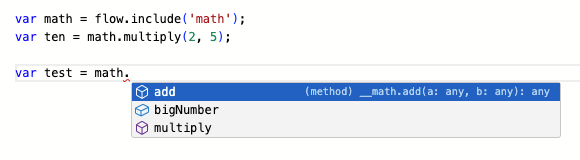
By default, parameter and return types are inferred from usage.
To provide richer type information and documentation, you can add JSDoc comments in the module flow.
Improving IntelliSense with JSDoc
Adding JSDoc comments to exported functions allows IntelliSense to:
- Show parameter and return types
- Display documentation on hover
- Warn when functions are called with incorrect arguments
Our math example with JSDoc annotations:
/**
 * Multiply two numbers
 * @param {number} a
 * @param {number} b
 * @returns {number}
 */
var multiply = function(a, b) {
  return a*b;
}

/**
 * Add two numbers
 * @param {number} a
 * @param {number} b
 * @returns {number}
 */
var add = function(a, b) {
  return a+b;
}

/**
 *  Big number to symbolise the maximum number
 */
var bigNumber = 10000;

exports.multiply = multiply;
exports.add = add;
exports.bigNumber = bigNumber;
This provides richer IntelliSense for users of the module:

It also enables validation when incorrect parameters are used:

Known limitations
Module inclusion and IntelliSense support are based on static analysis of the module flow’s source code. Only exports that are assigned directly to the exports object (for example exports.myFunc = myFunc) can be detected and exposed through IntelliSense. Dynamic export patterns, conditional exports, or modifications to exports via indirect references are not supported.
Function declarations using the function keyword are presented for the user as if they were designed as an arrow function syntax. (function f(a) { return 2*a; } will be presented as f: (a any) => any.
Documentation text on parameters will not reflected to Intellisense.
These limitations only affect the editor experience. Runtime behavior is unaffected, but IntelliSense may not fully reflect the dynamic behavior of more complex modules.
Notes and best practices
- Only values assigned to
exportsare visible to consumers - Use JSDoc to document public module APIs
- Avoid mutating
exportsconditionally, as this may reduce type accuracy - Prefer explicit exports over exporting entire objects
Run flow
Run another flow with the run(...) method. You provide the input to the flow and will get the outputs of the flow.
Parameters
namethe name, subject or id of the flow to run - if there are 0 or more than 1 flow with this name anErrorwill be thrownenvironmentis a JavaScript object containing the input to the flow. Each property on the object will be mapped to an input. Currently only string values are supported. Inputs are accessed in the running flow withInputs["<inputname>"]e.g.Inputs["myinput"]or simply<inputname>e.g.myinput(if the<inputname>is a valid JavaScript identifier).sessiona session selector (see below)options(optional) which can include;allowLaunch(bool) allow Manatee to launch the application, default istrueallowVirgin(bool) allow Manatee to run the flow before the state of the application has been synchronised
Disambiguation
Since it is possible and valid to have flows in multiple apps with the same name, it can be ambiguous which flow should be chosen by Flow.run. If flows called ExampleFlow exist in apps A and B and a flow on app A runs Flow.run('ExampleFlow'), manatee will always prefer the matching flow from the same app (A) as the calling flow.
Note that if ExampleFlow exists in apps B and C and a flow in app A calls Flow.run('ExampleFlow'), you can’t be sure which flow is called. In such cases you can use the subject or id of the flow as the first argument instead - or rename one of the colliding flows.
Examples
var result = Flow.run("MyOtherFlow", { "inputA": "AAA", "inputB": "BBB" });
// "MyOtherFlow" will now get executed, the inputs may be accessed via e.g. Inputs["inputA"] in "MyOtherFlow"
var outputC = result.outputC; // providing "MyOtherFlow" has a defined output called "outputC"
It is possible to chain flows like:
var result = Flow.run("RunLast", Flow.run("RunFirst", {}));Run a flow only if the application is already running and connected to Manatee:
var result = Flow.run("RunThisOnlyIfAppIsRunning", {}, null, { allowLaunch: false });Flow.run to run flows in another session
In order to run a flow in another session you need to provide a third argument to Flow.run. This “session selector” argument can either be a function acting as a predicate on the states of the sessions or a an object that contains keys and values to match.
Using a predicate
We’ll assume we have the following sessions currently available.
- Session 1 with app A (instance 1) has the following state;
s1 = v1. - Session 2 with app A (instance 2) has the following state;
s1 = v2.
If we want to run the flow “foo” in session 2 then we do:
Flow.run("foo", null, function(state) { return state["s1"] === "v2"; });Using a key-value match
Using the same sessions described above we can match session 2 again using a the key-value match:
Flow.run("foo", null, {"s1": "v2"});The key-value matcher will also create the session if it does not exist - this will not happen using the predicate approach.
Stop the current flow
Use the stop() method to stop a running flow gracefully.
Flow.stop();